
For viewers
Co-working together
Everything you need to join in on my streams: add your tasks, focus with the pomodoro timer, hatch a mini pet and play with Mika, all from Twitch chat.



Start here
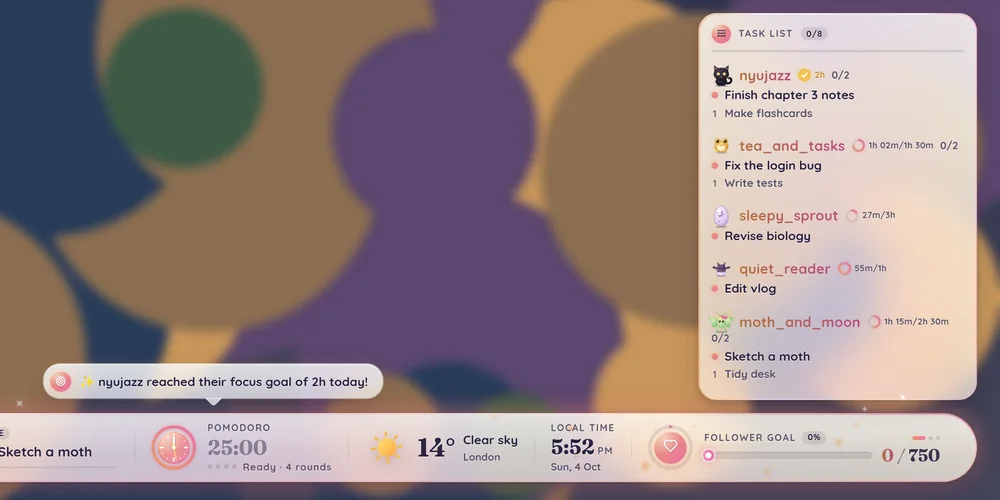
The glassy bar along the bottom of my stream is how we work together. Add your tasks, focus with the pomodoro timer, check in to hatch your own mini pet, and play with Mika. It all works by typing commands in Twitch chat (my helper, hartfelt_bot, answers you there): no sign-ups, no extensions, and it's free for everyone.
- Add your task. Type
!taskand what you're working on, like!task Revise biology. - Focus with us. Type
!joinand the timer counts you in. - Check in. Redeem my Check in channel point reward once every stream to collect a stamp. Ten stamps hatches your egg into a mini pet.
When you finish your task, type !done and enjoy the sparkles.
Meet hartfelt_bot
hartfelt_bot is the little helper in my chat. It passes your commands to the bar and answers you in chat, so you always know your command worked, even before the stream catches up.
- It replies to you. Add a task and it wishes you luck; finish one and it counts how many chat has done today; check in and it tells you how close your egg is to hatching.
- It merges busy moments. When lots of people type at once, its replies are bundled into one message so chat doesn't get flooded.
- It reminds us gently. While I'm live, it sometimes pops in with a reminder to add your task or join the timer.
- Some commands answer on the bar. Things like
!mypetor!focustimeshow a pop-up on stream, and hartfelt_bot lets you know it's there.
Ask it for help
| Type this | What happens |
|---|---|
!howto | The three-step guide to co-working with us. |
!info | A quick welcome, with a link to this page. |
!barcommands | A link to every chat command. |
!taskhelp, !pomohelp, !pethelp, !mikahelp | How tasks, the timer, pets and Mika work, with a link to the right part of this page. |
!focushelp, !timerhelp, !overlay | How focusing together, the pomodoro rounds and the bar itself work. |
Each help command can be used once every 30 seconds, so the answer isn't repeated over and over.
What's on the bar

- Music: what's playing right now.
- News: announcements, recent supporters and the gratitude wall.
- Co-working: takes turns showing what everyone's working on.
- Timer: the pomodoro timer, and how many people are focusing with you.
- Weather: the real weather where I am (and the moon at night).
- Time: my local time (UK) and how long we've been live.
- Goals: stream goals, like followers or a group focus goal.
- Task list: everyone's tasks, with mini pets, focus rings and badges by their names.
- Mika: a little version of my dog Mika, who lives on top of the bar.
Tasks
Tell us what you're working on and it shows up on stream, on the bar and in the task list on the right. Every time you tick something off you get sparkles and a little pop-up.
- Type
!taskand what you're doing, like!task Revise biology. - Work on it with us.
- When you've finished, type
!done. That's it!

How the task list works
- You always have one current task. It's the one with the pink dot, and it's what everyone sees.
- Anything else you add waits underneath in your backlog, numbered 1, 2, 3…
- Finished tasks get a green tick and a line through them.
- The numbers by your name (like 1/3) show how many you've finished out of how many you've added.
- The Co-working part of the bar takes turns showing everyone's current task.
- If you've hatched a mini pet, it sits next to your name.

Adding tasks
| Type this | What happens |
|---|---|
!task Cuddle dog | Adds a task. If you already have a current task, the new one joins your backlog. |
!task Feed dog; Walk dog | Adds several at once. Split them with a semicolon. |
!later Feed dog | Adds a task to the end of your backlog (works with ; too). |
!soon Feed dog | Adds a task to the front of your backlog. |
!randomtask | Stuck? Get a small, positive task added for you. |
Finishing tasks
| Type this | What happens |
|---|---|
!done | Ticks off your current task. |
!done next | Ticks it off and starts your next backlog task. |
!done 0; 1 | Ticks off several at once (0 is your current task, 1, 2… are your backlog). |
!done all | Ticks off everything. |
!mydone | Shows how many tasks you've finished today. |
Switching and tidying
| Type this | What happens |
|---|---|
!now Cuddle dog | Makes this your current task right now (the one you were on moves to your backlog). |
!now 1 | Swaps backlog task 1 with your current task. |
!now next | No current task? Brings your next backlog task forward. |
!now skip | Swaps your current task for the next one in your backlog. |
!rename Cuddle dog | Renames your current task. |
!remove | Removes your current task. |
!remove 1 or !remove 1; 2 | Removes backlog task 1 (or several). |
!remove all | Removes all of your tasks. |
!mytasks | Shows your tasks on the bar. |
!backlog | Shows your tasks on the bar, including everything in your backlog. |
!task | On its own, shows your current task on the bar. |
My task didn't show up
Tasks with links in them are ignored, and so are a few blocked words. Keep tasks short and simple, like !task Write intro paragraph.
Do my tasks disappear when the stream ends?
No. They stay on the list until you remove them, or until a mod or I tidy the list, so you can carry on where you left off next stream.
I added a task by mistake
Type !remove to remove your current task, or !remove 1 for backlog task 1.
The pomodoro timer
We focus together for a set time, then take a break together. Type !join and the bar counts you in, tracks your focus time, and gives you badges as your hours add up.
The Focus part of the bar shows how long is left in the current round. Usually it's 50 minutes of focus, then a 10-minute break. My mods and I run the timer, so you just need to join in. During focus, Mika naps (but still hops up for follows, subs, bits and tips). During breaks the bar asks things like "What did you get done this round?", and sometimes there's a fun poll or a stretch-along.
Join the focus
- Type
!joinduring stream. - The timer shows how many people are focusing with you, and a little ring appears by your name on the task list.
- When a focus round ends, the bar thanks everyone who joined, by name.
- Type
!leaveif you need to head off.

Set a daily focus goal
Type !goal 2h (or !goal 90m, or !goal 1.5) to set how long you want to focus today. A ring by your name fills up as you focus, and turns gold with a sparkle when you reach it. !goal on its own shows your progress, and !goal off removes it. Goals reset each day at 5am UK time.
Halfway mood check
Halfway through the first focus round of each stream, the bar asks "How's it going?". Answer from 1 (rough) to 5 (great) with !mood 1 to !mood 5. Everyone's answers make a little mood meter under the timer. You can share your mood with !mood any time, not just when it asks.
Focus time, the leaderboard and badges
Your focus time is saved: today, this month and all time. Only time while you're joined and a focus round is running counts. Badges are earned by your total focus time, and show next to your name on the bar, the task list and the leaderboard. From Adept (25 hours) up, the whole bar celebrates each new hat with confetti. Type !badge to see your hat and how long until the next one, or !badges to see them all.

!focustime pop-up.Every badge is a little felt wizard hat. The more you focus with us, the grander your hat.
| Badge | Focus time |
|---|---|
 Novice | 1 hour |
 Initiate | 5 hours |
 Apprentice | 10 hours |
 Adept | 25 hours |
 Enchanter | 50 hours |
 Mage | 100 hours |
 Sage | 250 hours |
 Elder | 500 hours |
 Archmage | 1,000 hours |
| Type this | What happens |
|---|---|
!join | Join the focus session. |
!leave | Leave the focus session. |
!focusing | Shows everyone who has joined. |
!goal 2h | Sets today's focus goal (!goal shows progress, !goal off removes it). |
!mood 4 | Shares how your focus is going, from 1 (rough) to 5 (great). |
!focustime | How long you've focused with us this month (!focustime @name for someone else, !focustime top for the top 3). |
!leaderboard | Top focusers this month (!leaderboard today, or !leaderboard all for all time). |
!badge | Your badge and how long until the next one. |
!badges | Shows every badge and the hours needed. |
Commands like !focustime show their answer as a pop-up on stream, and hartfelt_bot lets you know in chat. !leaderboard and !badges can be used once a minute.
Check-ins & pets
Check in once a stream to collect stamps. Fill your card and your egg hatches into a little mini pet that lives next to your name on the task list. Keep checking in and it grows up, earns gifts and celebrates its hatchday.
- Redeem my Check in channel point reward once each stream (there's nothing to type). A stamp card pops up on stream, you get a stamp, and hartfelt_bot tells you how many check-ins you're on.
- From your first stamp, a little egg sits next to your name. It cracks a bit more as your card fills up.
- Ten stamps fills your card and your egg hatches!
- Name your new friend with
!petname. - Keep checking in and your pet grows up, then earns gifts.

A "stream" counts as a day, from 5am to 5am UK time. If you redeem the reward again the same day, hartfelt_bot lets you know you've already been stamped. Typing !checkin in chat just reminds you to use the reward.

Your pet on the task list
Your pet only shows while you have a task on the list, so add one with !task. Pets blink and breathe next to your name, nap during breaks, hop and sparkle when you finish a task, and show little hearts when someone pats them.
Type !mypet to show off your pet's card: its kind, how grown up it is, its check-ins, age and pats. !mypet @name shows someone else's.
Which pet will I get?
There are 12 kinds of pet, and each has a rare version. One in ten eggs hatches rare.
| Pet | Rare version |
|---|---|
| 🦇 Bat | White bat |
| 🐸 Frog | Golden frog |
| 🐌 Snail | Amethyst snail |
| 🍄 Mushroom sprite | Glowcap sprite |
| 👻 Tiny ghost | Spectral ghost |
| 🐦⬛ Raven chick | White raven |
| 🦋 Moth | Luna moth |
| 🐈⬛ Black kitten | Starry kitten |
| 🦊 Red fox | Silver fox |
| 🐿️ Grey squirrel | Red squirrel |
| 🦔 Hedgehog | Blossom hedgehog |
| 🦌 Fawn | Moonlit fawn |
If you're the first in the community to hatch a kind (or a rare kind), your card says so! Type !pets to see the whole community's collection. Kinds nobody has hatched yet show as shadows.
Growing up
| Stage | When |
|---|---|
| 🐣 Hatchling | Just hatched (still in its shell) |
| 🌱 Little | 20 check-ins |
| 🌿 Grown | 30 check-ins |
| 🌙 Moonblessed | 50 check-ins, with a soft glow and a tiny moon |

Special stamps and surprises
- Golden stamps: check in five streams in a row and you get a shiny gold stamp that counts double.
- Gifts: once your pet is Moonblessed, every full card brings a gift for it to wear: a pink bow, a witch hat, a flower crown, then a little lantern. Switch between them with
!petwear. - Hatchdays: a year after your pet hatched, your first check-in that week gets a birthday card with confetti and a cake.
- Spooky season: every October, pets without a gift put on a little pumpkin or witch hat and the stamp card turns spooky. On Halloween, your first check-in lands a one-off golden pumpkin stamp that counts double.
- Pats: type
!petpat @nameto give someone's pet a pat. Little hearts float up beside their name.
Swap your pet with channel points
Want a different kind of pet? Use the Swap my pet channel point reward, and in the message box type the pet you want: bat, frog, snail, mushroom, ghost, raven, moth, kitten, fox, squirrel, hedgehog, deer or random. Your pet keeps its name, its growth and whether it's rare. Picking random gives you a new kind and a fresh chance at a rare one.

You need a hatched pet first. If you don't have one yet, typed a pet the bar doesn't recognise, or picked the kind you already have, a pop-up tells you and nothing changes. Ask me or a mod to refund your points.
| Type this | What happens |
|---|---|
| Check in (channel points) | Get your stamp for this stream (once a stream). |
| Swap my pet (channel points) | Change your pet's kind: type the pet you want in the message box. |
!mypet | Show your pet's card (!mypet @name for someone else's). |
!petname Biscuit | Name your pet. You can only do this once, so choose carefully! |
!petpat @name | Pat someone's pet. |
!petwear hat | Choose which gift your pet wears: bow, hat, crown, lantern or none. |
!pets | Show the community's pet collection. |
I missed a check-in. Can I get my stamp back?
Ask me or a mod and we can give you one.
I redeemed Check in but nothing happened
Give it a few seconds: the stream runs a little behind chat. hartfelt_bot should answer in chat straight away. If it doesn't, let me or a mod know and we'll stamp your card for you.
My pet isn't showing on stream
Pets only show next to people on the task list. Add a task with !task and it'll appear.
I named my pet wrong
You can only name your pet once, but my mods and I can rename it for you.
Will I lose my pet if I miss streams?
Never! Your stamps and your pet are saved forever. Missing a stream only resets your golden stamp streak.
Mika
Meet Mika! She's a little version of my real dog Mika (who you might spot on stream), and she lives on top of the bar as a fluffy black Pomeranian. She naps while we focus, gets the zoomies on breaks and loves treats. You can play with her from chat.

| Type this | What happens |
|---|---|
!pet | Give Mika a little pat: floating hearts and a happy wiggle. |
!treat | Toss Mika a treat. She catches it and munches happily. |
!fetch | Throw a ball along the bar. Mika chases it and trots back with it. |
!boop | Boop her nose: a scrunched-up face and a tiny "achoo!" |
!outfit bow | Vote for Mika's outfit: bandana, crown, bow, witch or none. |
!find timer | Hide and seek: guess where Mika is hiding. |
!mika | Show Mika's all-time stats. |
Each person can use each of these about every 20 to 30 seconds, so Mika doesn't get overwhelmed.
Dress Mika up
Vote with !outfit and the outfit's name. When three people vote for the same outfit within 15 minutes, Mika puts it on, and she keeps it on between streams. !outfit none votes to take it off.
Hide and seek
On some breaks Mika sneaks off and hides behind part of the bar, with just her ears peeking out. Spot her ears, then type !find and where you think she is: music, news, tasks, timer, countdown, weather, clock or goals. Guess right first and you win! If nobody finds her, she pops out with a "Peekaboo!" when focus starts.

What Mika does on her own
- Naps during focus rounds, with her head on her paws and little z's.
- Has a big play-bow stretch when a break starts, and the occasional zoomies.
- Hops up with hearts for follows, subs, tips, bits and finished tasks.
- Hears her name: say "Mika" in chat and she tilts her head.
- Happiness heart: pats, treats, fetches and boops fill a little heart. When it's full, she does a happy dance in the middle of the bar.
- Reacts to the weather: she shakes off the rain, chases snowflakes, sunbathes, or shivers when it's cold.
- Welcomes raiders and waves at first-time chatters.
- Late-stream yawns: after a few hours live she yawns and reminds everyone to stretch and drink some water.
- Seasonal hats: a witch hat at Halloween and a Santa hat at Christmas.
Mika remembers every treat, pat, boop, fetch, hide-and-seek find and happy dance, forever. Type !mika to see them all. When a total hits a milestone (like 100 treats), the whole bar celebrates!
Community
Co-working is better together! Cheer each other on, vote in polls, share your wins and add to the gratitude wall.
Cheer someone on
Type !cheer @name to send someone a little heart. A pop-up appears on stream, and a "from you" bubble shows by their name on the task list.

Polls
During breaks a fun poll sometimes pops up above the bar. Vote with !vote 1 (the option's number) or !vote coffee (its name). You can change your vote until the poll closes, then the winner is announced.

Share your wins
Finished something you're proud of? Big or small, share it! Type !win and what you did, like !win finished my essay. It pops up on the bar, and all of today's wins scroll past in the end-of-stream recap. !wins shows everyone's wins from today.

The gratitude wall
Type !thanks and something you're grateful for, like !thanks my cat for keeping me company. Your note joins the announcements on the bar and appears in the recap.
Community milestones
The bar keeps all-time totals for everything we've done together: hours streamed, hours chat has focused, tasks finished and pomodoro rounds. Each time we pass a milestone, the whole bar celebrates with confetti. Type !milestones to see where we're at.

Other things you might see
- Stretch-along: on some breaks the bar walks everyone through a few stretches, with a countdown for each.
- Session goals: I sometimes set a group goal for the stream, like 4 rounds or 20 tasks.
- Supporter pop-ups: follows, subs, tips, bits and raids all get a thank-you, and if lots happen at once they join into one growing combo.
- Raid welcome: the whole bar welcomes raiders with their name and confetti.
- Chat energy: the busier chat gets, the brighter the bar's glow.
| Type this | What happens |
|---|---|
!cheer @name | Send someone a little cheer. |
!vote 1 | Vote in the current poll (or type the option, like !vote coffee). |
!win finished my essay | Share a win from today. |
!wins | Show today's wins on the bar. |
!thanks my cat | Add a note to the gratitude wall. |
!milestones | Show everything we've done together and the next milestones. |
Oracle, tarot, the stars & lurking
A little bit of magic: draw your oracle or tarot card for the day, read your horoscope, lurk as a spooky snooper, and check tonight's moon.
Oracle cards
Type !oracle to draw your card of the day. A little tarot-style card flips over above the bar with its name and a gentle message, like The Toadstool: rest is part of growing. Take your break without guilt. You get one card a day (5am to 5am UK time); ask again and you'll be reminded which card you drew.
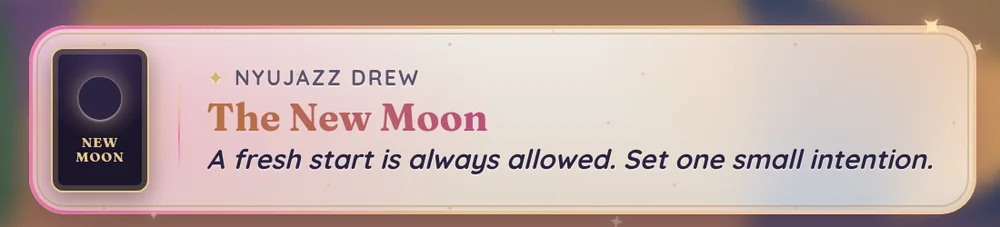
Tarot cards
Prefer tarot? Type !tarot to draw your tarot card of the day. It can land upright or reversed, and comes with a short, kind reading. Like the oracle, it's one card a day.
Your horoscope
Just type your star sign on its own in chat, like leo, !leo or ♌, and your horoscope for today pops up on the bar. The bar remembers your sign, so next time !horoscope (or !horo) is all you need. !horoscope pisces changes the sign it remembers. A sentence that only mentions a sign, like "my sister is a leo", is ignored.
Lurking
Watching quietly? That's lovely, I'm so glad you're here! Type !lurk to become a spooky snooper: a little ghost floats by your name and you're added to the "Spooky snoopers" line at the bottom of the task list. When you're back, type !unlurk (or !back) and your ghost floats away. Lurkers are cleared each day.

The moon
The bar knows tonight's real moon phase. At night the weather icon shows the moon just as it looks tonight, and full and new moons get a soft glow and a pop-up. Type !moon to see the phase, how much is lit and when the next new or full moon is.

| Type this | What happens |
|---|---|
!oracle | Draw your oracle card of the day. |
!tarot | Draw your tarot card of the day (upright or reversed). |
leo (or !leo or ♌) | Your horoscope for today, and the bar remembers your sign. |
!horoscope | Today's horoscope for the sign you saved. |
!lurk | Become a spooky snooper. |
!unlurk | Come back from lurking (!back works too). |
!moon | Tonight's moon phase. |
Schedule & stream extras
Find out when my next stream is, and what the bar does at the start and end of a stream.
Type !schedule and a card pops up above the bar with my next few streams, friendly times like "Tomorrow 7pm", and how long until each one. Times are in UK time.

The end-of-stream recap
At the end of a stream I play the recap, a little slideshow across the bar: how long we focused together, rounds and tasks finished, the top finishers, check-ins and pet moments, everyone's wins, my next stream, and a thank-you with confetti.

Other bits on the bar
- Countdown: sometimes the bar counts down to something, like the end of a subathon or a special stream.
- Weather: the real weather where I am. Golden hour glows warm, and dusk fades into purple.
- Seasonal themes: the bar dresses up through the year, with falling leaves in autumn, pumpkins and bats at Halloween, and snow and fairy lights at Christmas.
- Live time: how long the stream has been live, next to the clock.
Co-working etiquette
My stream is a cosy, kind space for working, studying and chatting together. Here's how we keep it that way.
While we focus
- Chat is always welcome, but during focus rounds lots of people are concentrating, so keep it gentle. Long chats and games are perfect for the breaks.
- Breaks are for stretching, snacks, water and catching up.
- Never feel guilty about stepping away, taking a longer break or leaving early. Rest is part of the work.
Your tasks
- Tasks show on stream for everyone, so keep them kind and family-friendly.
- No links or self-promotion in tasks (the bar ignores links anyway).
- Every task counts! "Drink some water" and "get out of bed" are just as welcome as "write my dissertation".
- Only add tasks for yourself, not for other people.
Being kind
- Cheer each other on with
!cheerand celebrate wins, big or small. - The leaderboard and badges are just for fun. Please don't compare yourself to anyone else: showing up is what matters.
- Lurking is always welcome.
- If you're having a hard day, it's okay to say so, and it's okay to rest.
Mika & the bar
- Mika loves attention, but please don't spam commands. There are short cooldowns so everyone gets a turn.
- If something on the bar looks broken, let me or a mod know.
Good to know
Do I need to follow or subscribe to use it?
Nope! Everyone in chat can use the bar.
I typed a command and nothing happened
Check it starts with ! and is spelled right, and send one command per message. Some fun commands (like !treat or !leaderboard) have short cooldowns, so wait a few seconds and try again. Still stuck? Ask me or a mod!
Does the bar remember me between streams?
Yes! Your tasks stay on the list until you remove them (or the list gets tidied), and your stamps, mini pet, focus time and badges are saved forever.
Who is hartfelt_bot?
It's my chat helper. It passes your commands to the bar and replies in chat so you know they worked. Bigger answers, like your pet card or focus time, pop up on the bar itself.
How do I check in on my phone?
Tap the channel points button next to the chat box, then pick Check in. There's nothing to type.
When does a new "day" start?
At 5am UK time. Check-ins, focus goals, oracle and tarot cards, horoscopes and wins all reset then.
- No space after the ! Type
!task Read, not! task Read. Capital letters are fine. - Tagging someone: type @ and pick their name from the list that pops up, like
!cheer @name. - Channel points (like the pet swap): tap the channel points button next to the chat box, pick the reward and type your message.
- Give it a few seconds. The stream runs a little behind chat, so pop-ups can take a moment to appear.
- Turn your phone sideways or go full screen to see the bar and task list properly.
Glossary
- Pomodoro
- Working in timed rounds: 50 minutes of focus, then a 10-minute break.
- Joining
- Typing
!joinso your focus time counts. - Streak
- Joining or checking in on streams in a row.
- Current task
- What you're working on right now.
- Backlog
- Your tasks waiting for later, numbered 1, 2, 3…
- Check-in
- Redeeming the Check in channel point reward once a stream for a stamp.
- hartfelt_bot
- My chat helper, who answers your commands in chat.
- Mini pet
- The creature that hatches from your egg and sits by your name.
- Hatchday
- Your pet's birthday, a year after it hatched.
- Familiar
- A magical animal companion. On my stream, that's Mika!
- Lurking
- Watching quietly. Always welcome! Lurkers are spooky snoopers.
- Recap
- The end-of-stream slideshow of everything we did.